
Go directly to the SourceForge.net Project Page
Thanks for trying CellarDoor, an Interactive Fiction interpreter for PalmOS devices. CellarDoor supports Z-Machine (Z-Code) and Glulx game files, including those wrapped in the Blorb file format (.zblorb and .gblorb files).
CellarDoor's Z-Code support is based on the Frotz v2.43 interpreter. Frotz is an Interactive Fiction interpreter which permits the play of Z-Machine (Infocom, Inform, Z-Code) games such as Zork and Hitchhiker's Guide to the Galaxy. CellarDoor supports V1-V8 games (including V6 with MG1/Blorb graphics).
CellarDoor offers Glulx support via the Git interpreter (1.2.2) and uses a (rather) modified version of the CheapGlk library (0.9.0). It supports JPEG and PNG graphics, if they are found in Blorb files.
It requires an ARM-based PalmOS device with hi-res screen, OS4 or later, an expansion card and the large dynamic memory area available from OS4 onwards. If your handheld does not meet these requirements, you may want to try Frobnitz, PilotFrotz or Kronos.
CellarDoor is free software; you can redistribute it and/or modify it under the terms of the GNU General Public License as published by the Free Software Foundation; either version 2 of the License, or (at your option) any later version. Elements of CellarDoor (CheapGlk, Git, Frotz, PEAL) may have their own, less restrictive, licensing terms. Please read the documentation for these packages for more information.
Note that some sections of this document currently presume a passing familiarity with CliFrotz, and describe several features relative to their function or (non)existence in that software. As CellarDoor continues to evolve, so will the documentation. Until then, new users who have no familiarity with CliFrotz, please bear with the presumption -- it shouldn't hinder getting CellarDoor up and running quickly.
Throughout the documentation, the words "story" and "game" are used interchangeably, depending on the author's attitude toward interactive fiction at the moment of writing.
Hotsync the CellarDoorInstaller_112.prc file with your PalmOS handheld. This will install CellarDoor and any required libraries on your Palm and launch the application. Make sure the expansion card is inserted before you install.
The first launch of CellarDoor will cause a Preference file to be created (it's called CellarDoorDB.pdb). Choose Preferences from the menu on the opening screen to choose your memory card (in case your Palm supports multiple) and to set various display options.
See below, in the sections "STORIES, FOLDERS & CATEGORIES" and "GRAPHICS AND AUXILIARY FILES" about installing your story files and any associated data.
NOTE for Tungsten T3 users only: Install the AppSlipRotate.prc and StatusBarLib.prc files (they MUST be installed together) from the PalmOne web site if they haven't already been installed. This will enable widescreen support. Or you can get them here.
Before you can actually play any games with CellarDoor, you'll need to a) have some and b) install them. Assuming that you already have some games, you need to get them, and all supporting files (.mg1 graphics, for a few Infocom titles) on your memory card. If you don't, see the section FINDING GAME FILES, below.
All supporting files (stories, saves, notes) must be located on your memory card, preferably in the /PALM/Programs/CellarDoor folder (generally in subdirectories, as outlined below). The easiest way to manage this is to use a memory card reader with your computer or a program like Sync Buddy (OSX: http://perso.orange.fr/fpillet/syncbuddy.html). Palm's Hotsync utility won't properly sync the types of files used by CellarDoor.The first time CellarDoor runs (and on subsequent launches, if the folders are missing), it creates several folders:
Your story files can live either in /PALM/Programs/CellarDoor or in /PALM/Programs/CellarDoor/Stories or in a subfolder which you create yourself inside of the Stories folder (e.g. /PALM/Programs/CellarDoor/Stories/Glk or /PALM/Programs/CellarDoor/Stories/Infocom). Each subfolder of the Stories folder will appears as a category in the categories popup in the opening screen. Three additional categories, "All", "Unfiled" and "Saves" will show up, as well. You shouldn't use these special names for your folders.
Story files should be in their original format (for Z-Code files, this is usually a .z# file (where # is a number between 1 and 8) or a .zblorb/.zlb file), for Glulx, this is usually either a .ulx or a .gblorb/.glb), and not in a Palm database format. Files are not parsed based on extension, but are 'sniffed' to determine their validity and format, so any extension is acceptable, as long as the file is the correct type.To create category subfolders and/or move your story files around, you'll naturally require a file manager or memory card reader. FileZ (http://www.freewarepalm.com/utilities/filez.shtml) is free and can help you with this task. Resco Explorer is not free, but is somewhat more pleasant to use. For convenience, you can move files between existing categories (folders) from within the Details screen inside of CellarDoor (but you can't create new ones).
If you don't want to use categories, instead using the "classic", CliFrotz mode, simply don't put any folders inside of /PALM/Programs/CellarDoor/Stories, in which case you'll have 2 tabs - Stories and Saves, just like in CliFrotz.
   The old (1.0.0) CellarDoor base file location of /CellarDoor is still supported,
   if present. Fresh installations of CellarDoor 1.0.1 and above use the new location.
**NOTE**: If you are updating from CliFrotz, you can rename your
/Frotz folder, at the root of your memory card, to /CellarDoor,
or move it to /PALM/Programs/CellarDoor.
Otherwise, you'll want to copy your games from /Frotz
to /PALM/Programs/CellarDoor after you've run the program once.
Classic Z-Code: If you are using a classic Z-Code story (e.g. Zork0.z6), for which you have a graphics file (Zork0.mg1), simply place the graphics file in the same folder as the story file. The file names should match the equivalent story files, i.e. the graphics file for Shogun.z6 should be Shogun.mg1. These files are available from: http://ifarchive.org/if-archive/infocom/media/mcga/. You might also want to look into getting or making .zblorb versions of these games, to take advantage of the new scalable graphics features in CellarDoor, as detailed here: http://babel.ifarchive.org/infocom.html.
Blorbs: Newer story files produced with Inform (Glulx or Z-Code) can include graphics, wrapped in the Blorb file format. Graphics for these games are "included" with the game, so to speak, so there's nothing for the user to do in this case. JPEG and PNG support is provided via the file CellarDoorLib.prc (included in the CellarDoor installer).
Note that PNG alpha channels are not currently supported.
Blorb graphic support can be turned on and off in the 2nd Preferences window.
Other files: Some games contain references to additional files. "Dracula2: The Arrival" for instance, uses a little file called HORRDAT for some reason I can't ascertain and completely freaks out if it can't find it. If the auxiliary file is located in the same folder as the story file, you'll be fine.
At the present time the Tungsten T3, T5, T|X, UX50/40 and Tapwave Zodiac support full landscape mode.
You will not be able to change the orientation while playing a game, because the interpreter engines get confused if the screen size changes in the middle of play. When accessing the Preferences from the Story List, there is an option to allow portrait mode (this is option is disabled when playing a game). Changing this option requires a restart of CellarDoor. On the Tungsten T3, T5 and T|X, the screen is forced to landscape widemode even when the slider is shut, or the DIA open.
CellarDoor supports Glulx stories in .ulx or Blorb file formats, thanks to Git (http://diden.net/if/git/) and CheapGlk (http://www.eblong.com/zarf/glk/index.html). I've had to make significant modifications to both in order to support Palm OS and the CellarDoor application model, so don't assume that anything will work as expected. ;)
In particular, CellarDoor supports multiple windows, including graphics, while CheapGlk only supports a blind, single-window terminal. Because of the limitations of the Palm screen (that is, because it's so small), I've deviated a bit from the Glk specification to try to make as many stories look as good as possible. This is principally achieved by limiting graphics and their windows to 1/2 of the requested dimensions. This may have some unexpected consequences, but testing indicates that this is a lot better than the default values on little screens. Most games look and play great.
Sound is not supported. Graphics in graphic windows are supported. Graphics in text buffer windows are partially supported (the graphic will be drawn, but the positioning will likely not be correct).
Infocom's games are still copyrighted, so you'll need to buy them or locate the ones which have been released into the public domain. But there's more to Interactive Fiction than Infocom, and there are hundreds of great, free Inform/Infocom (Z-Code) games available from:
http://mirror.ifarchive.org/if-archive/games/zcode/
You can find Glulx games at:
http://mirror.ifarchive.org/if-archive/games/glulx/
There's a large and active community of people making new and involving Interactive Fiction. See the list of "LINKS" at the end of this document for some other starting points for finding new story files.
When running CellarDoor for the first time, check the "Check Heap RAM" menu to see if you have enough RAM available. If you have less than 800KBytes free then you will likely have problems running many larger Z-Code games, and you can probably forget about Glulx entirely. This free RAM is not the same as that shown in the Application launcher.
If the available RAM is low, pictures may not be drawn. For Z-Code games with associated .mg1 picture files, if you have lots of free heap RAM available, the picture file will automatically be cached in memory resulting in a speedup; on OS5 ARM devices this speedup is substantial. Blorb graphics are not currently cached.
For more information about memory-related issues, see the FAQ, below.
The Story List is the central place in CellarDoor for finding and working with your story files. It looks like this:
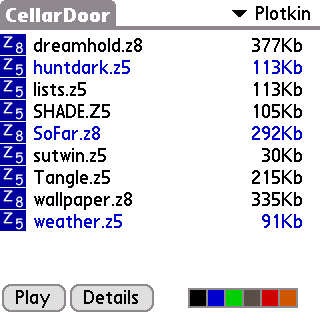
If you created subfolders in your Stories folder (see above in STORIES, FOLDERS & CATEGORIES for more information), they are available from the drop-down menu in the top-right corner of the screen as categories. Otherwise, you'll have 2 categories: Stories and Saves.
On the bottom of the screen, you can see the 'Play' and 'Details' buttons. 'Play' takes you to the interpreter window, while 'Details' opens the details form, where you can rename, delete, move and tag the selected story file. The color widget on the bottom right allows you to filter your games by tag. Here's the quick rundown:
Clicking in the menu bar area of the screen, or touching the menu button on your device (if it has one), will open the menus, where you can get information about your Heap RAM, open the Main Preferences screen, or check which version of CellarDoor you're running.
The Details form looks like this:
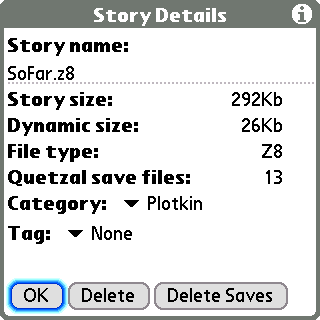
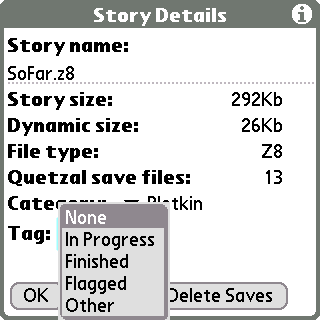
Most of the items here are self-explanatory, although you can click in the Information widget in the top-right corner for a description of the items displayed here. If you change the story's category, it will be moved to the selected category folder (this might take a few seconds). You can choose a new tag for your story by clicking on the Tag drop-down menu:
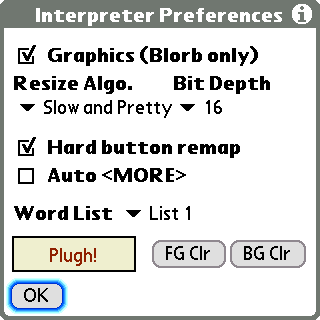
There are actually two Preference screens. The main screen (which is 2 forms) can be accessed from the Story List, and permits changing all configurable options in CellarDoor. The second screen (a single form) can be accessed during game play, but has only a very limited selection of options. This section deals specifically with the first set of Preferences screens, but is applicable to the second (since it's just a subset of the full preferences). Anyway, the first form looks like this:
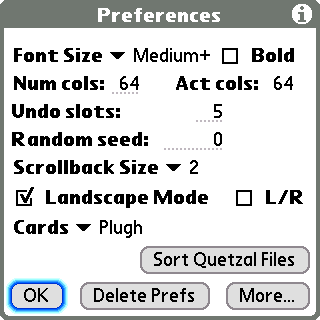
As with the Details form, the Information icon yields an in-application description of the items here. But here's a quick summary:
**IMPORTANT**: In general, the "NUM COLS" value in the Preferences
should always be set to the save value as "ACT COLS". When you start CellarDoor
for the first time, or when you rebuild your preferences, "Num cols" will
automatically get set to a correct default value, based on your screen resolution.

There are some games which don't run, or don't run properly, if they don't have
a certain number of columns available to them. If you are trying to get one of
these games working, you may need to experiment with the "Num Cols" setting.
If you are experiencing problems when using a non-widescreen device, try setting
the "Num cols" to a value of 63 or more.
Changing either Landscape preference necessitates a restart of CellarDoorPushing that 'More...' button gets you to the second screen:
This is where you play.

Most of what happens here is up to the game, but there are a few things to be aware of.
When playing a game, tapping on a word will bring up a menu permitting quick word entry, with contextual substitution (the Verb List). Tapping anywhere on the screen where there isn't a word brings up the command list menu (the Word List). This is what the Verb List looks like when clicking on the word "Rito":
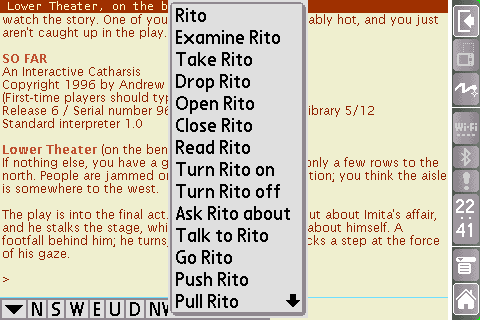
You can scroll backward by dragging the screen. When you scroll back, you can tap on words and whitespace, just as when the screen is in its "normal" position. Selecting a word, writing a letter, etc. will cause the screen to jump back to the text entry line.
Some games support a "Mouse" such as Journey and Zork Zero. CellarDoor emulates mouse "clicks" by tapping on the screen, e.g. you can tap on a word in Journey.
The most important screens which you can reach from the menu in the interpreter are the Interpreter Preferences, the Verb List and Word List editors, the Save and Restore forms and the Notes.
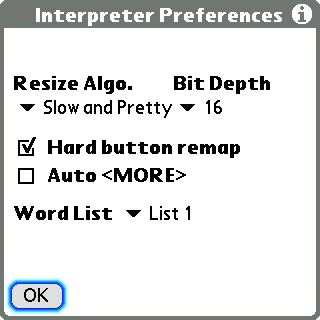
Note this this is a slimmed-down version of the second preferences screen, discussed above. There's nothing new here; these are, however, the only items which can be changed during game play.
The Verb List:
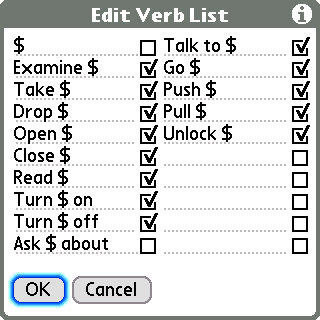
and the Word List:
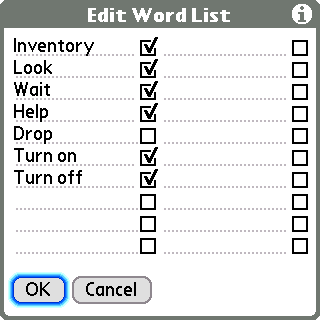
can be used to quickly insert commonly used text into the interpreter. They both function identically, except that the Word List doesn't support contextual subsitution. The Verb List does: the '$' character will be replaced by whatever word was tapped in the interpreter. The check mark after the entries determines whether a carriage return/enter will be added after the selected text is inserted in the interpreter.
You can add up to 20 verbs (with contextual substitution) and another 20 words (no substitution) to the pop-up menus which appear when you click on text (for the verbs) or non-text (for the words) in the Interpreter window. There are, in fact, 2 sets of verb and word lists, in principle for users who like to play in multiple languages, but you can use them for whatever you like. Switching between the 2 list sets can be accomplished from the 2nd Main Preferences screen (or from the Interpreter Preferences).
Choosing the Save menu item yields the Save form:
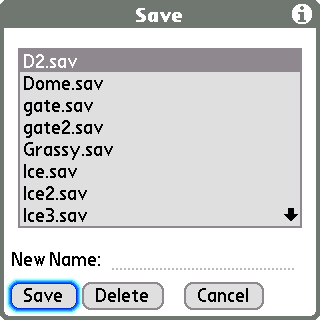
Here, you can save your game under a new name, or select a previously saved game and save over it. The Restore form looks more or less the same, just without the 'Delete' button.
New saved games are written to subfolders of the /PALM/Programs/CellarDoor/Saves folder. The subfolders are named after the story file being saved (e.g. SLOUCH.z5's saved games are written to a folder called /PALM/Programs/CellarDoor/Saves/SLOUCH/).
If you are upgrading to CellarDoor from CliFrotz, you may want to go to the (Main) Preferences screen, where you'll find a button labeled "Sort Quetzal Files". Tapping this button will cause saved games to be sorted into folders. "Orphaned" saved games (for which there are no story files) are moved to a folder called "Unsorted".
Regardless of whether you sort your saved games or not, CellarDoor will find any saved games in the /PALM/Programs/CellarDoor/Saves directory or in a subfolder thereof.
   **NOTE**: Due to a limitation of the interpreter, you can't automatically
   restore saved games by choosing them from the Saves category in the Story List.
   The associated story file will be opened, and you can manually load the saved
   game with the "Restore" menu command.
Notes are stored as simple text files named on a per-game basis (SLOUCH.z5's notes are called SLOUCH.txt) and can be found in the /PALM/Programs/CellarDoor/Notes folder. They are available from the interpreter during game play, and can be up to 64K in size.
The "Hotkey" menu enables access to the Frotz Hotkey functions such as undo, record, playback and debugging. When using Record and Playback the file is put into the /PALM/Programs/CellarDoor/Misc directory, the name is automatically generated from the Story filename. For example, a playback file for story Zork1.z3 is named Zork1.rec
Transcripts, i.e. the "script/unscript" command also go into the /PALM/Programs/CellarDoor/Misc directory. These are plain text files, and have the extension .scr.
If CellarDoor crashes before a game starts, try freeing up some internal memory (do a soft reset, for instance, or run a cache flushing utility). If it continues to crash and you can't get the game to start, try deleting the CellarDoorAS and CellarDoorDB databases using a File Manager utility such as FileZ (hint: they are generally right next to the program file). Some games also understand the "verify" (or "$verify") command. If your game starts, but crashes after a few turns, try running "verify"/"$verify" to see if the file is corrupt.
If you get stuck in an endlessly screwing-up Autosave loop (try running Winter Wonderland with "Num Cols" set to 45), where you can't regain menu control over CellarDoor, you can either use a file manager to delete the CellarDoorAS database, or you can start CellarDoor with the 'down' button held (or press it immediately as you launch). If an Autosave session is about to be restored, you'll get a dialog box prompting you whether you'd rather just delete the Autosave file and return to the Story List.
My game looks kind of funny. If I had to describe it, I'd say it's leaning to the right -- text is centered weirdly and gets cut off on the right margin sometimes.
You should double check that "Num cols" matches "Act cols" in the Preferences. This is only a preference because some games won't work at 45 column width (e.g. Winter Wonderland), so you have to trick them (hint: Winter Wonderland does work at 47 column width, and looks fine at 64 on a wide screen). In general, you always want "Num Cols" and "Act Cols" to match.
Can I add my own fonts to CellarDoor?
Golly, no. Not yet, in any case.
My kind of big built-with-Inform-7 game (probably .z8 or Glulx) is kind of SLLLLLLOOOOOOOOOOWWWWW. What's up with that, dude?
Dude, it's a Palm. 312 MHz v. 2.6 GHz (to compare my Palm to my laptop) is a HUGE difference, if we're just comparing processor speed, and there are many, many more hardware and software considerations. I think it's all running pretty quickly, all things considered. Theoretically, some of the core interpreter code (which is where the app spends most of its time) could be moved out of the 68K application and into ARM resources for an unknown potential speedup. But that's not much fun, and I haven't done the necessary research to see if it's really feasible.
I want to play MEGAKLO.z8 or MAGDJAGD.blb and CellarDoor seems to load it ok, but then it gives me a memory error. Sometimes it seems to work ok, but then it just crashes!
Most likely, you have reached the frontier of your Palm's memory allocation abilities. There are a couple of things which you can try, although no guarantees. On newer Palms, check out Dmitri Grinberg's UDMH (http://palmpowerups.com/modules.php?name=Content&pa=showpage&pid=2). On the Tungsten T or T2, look at the Fargo Heap Resizer (http://fanoush.wz.cz/palm/fhr.html).
Does CellarDoor support TADS, Magnetic Scrolls, or any other kind of game not listed above in the features list?
No. I would have mentioned it otherwise. Everyone likes bullet points.
Why does the world need another freakin' Open Source PalmOS interactive fiction interpreter?
It probably doesn't. But I wanted to fix some bugs in CliFrotz and got a little carried away. As far as I know, none of the other interpreters are in active development, and it's arguably more important to have 1 active project than 3 inactive ones. CellarDoor is approaching what I want, personally, in a portable interactive fiction interpreter, and none of the other options were working for me. I presume I'm not the only one in that situation.
My game's frontispiece graphic isn't showing up!
If the frontispiece graphic doesn't fit in the Palm dbCache, it won't display. For instance, on a Palm Tungsten E2, none of Emily Short's newer frontispieces (several megabytes decompressed) appear. This appears to be a limitation of the graphic libraries I am using. You can try something like dbCacheTool or Reset Doctor to flush the dbCache (or a soft reset), or you can remind yourself that you're playing text games, and not worry about it.
See the next question for even more information about this.
What is the CellarDoorLib.prc and why do I need it?
CellarDoorLib.prc is a kind of 'best-of' image reading library, comprising certain elements lifted from pnoJpegLib and palmPNG, modified and relinked into a new .prc file. Earlier versions of CellarDoor used these two libraries to manage JPEG and PNG graphics. Starting at version 1.1.0, CellarDoorLib.prc is used exclusively for graphics.
Why the change? Due to a problem/limitation of UDMH, it was necessary to adjust the way images are allocated in CellarDoor. When you allocate images on Palm, you generally do it in the dynamic heap. Since UDMH "extends" the dynamic heap into the storage heap behind the scenes, there's always a chance that you will allocate images in the storage heap when UDMH is enabled. In this case, though, calls to _free_ the image don't work, because the Bitmap Manager assumes that you're reading an image out of a database "on disk". So memory begins to fill up without being released. It looks and feels like a bad memory leak, causes the dbCache to fill up with unfreed blocks, and after a little while, or after loading a few large images (such as blorb frontispiece graphics), you have to soft reset in order to have normal use of your Palm again.
Because CellarDoor, starting at version 1.1.0, allocates a little more screen memory than previously (and permits the user to allocate even more for scrollback), I wanted to solve this problem. It involved making a fundamental set of changes to the 2 graphics libraries -- they now create Bitmaps 'by hand' using some code I found here, allocated using normal Memory Manager functions, rather than using the OS's Bitmap API. This ensures that they can be freed.
Since it made me nervous to distribute modified versions of perfectly good libraries, I decided to recompile the elements I'm using under a new name and type code. The result is a somewhat leaner library (142K instead of 190K for the two libs together) without any compatibility issues for people who use those libraries for other software. CellarDoorLib.prc can exist perfectly fine next to the originals and will cause no conflicts or problems. Using this library (and code from the library which is also in the main application), CellarDoor is now able to release all of the memory that it uses for graphics (and consider, the playing screen is a graphic!), so this is a massive improvement whether you are using games with pictures or not.
So, you have to use it if you intend to read images from blorb files. If you're not using pnoJpegLib or palmPNG for anything else, you can safely delete them.
I have a high-resolution OS4 Sony Clie. What can I expect?
Good question. Given that the original app I was working with was called 'CliFrotz', I've been somewhat reluctant to leave Clie users out in the cold, despite the limitations of the OS4 Clie devices. OS4 Clie support was broken in versions 1.1.0 and 1.1.1, but fixed back up for 1.1.2. There are, however, some caveats.
First, CellarDoor needs more memory for display than before. As a result, OS4 Clie devices are, by default, put into 4-bit greyscale mode, rather than 8-bit color mode. You can override this by choosing the 'High' bit depth setting in the Preferences form, but I wouldn't recommend it, unless you are mostly playing .z3 and .z5 games.
Second, I've limited the ZCode stack size to 1K on OS4 Clie devices, rather than the ~32K available to OS5 devices. This means, practically, that you can't play games made with Inform 7 on an OS4 Clie. I doubt that Glulx games run at all, but I didn't make any changes to the Glulx code to accomodate OS4 machines.
If none of that sounds so bad, then please enjoy!
Can I contribute to the continued development of CellarDoor?
Depends what you mean.
If you mean, give me money so that I will continue to work on it, I'd prefer that you donate it to a left-leaning, non-religious charity or NGO of your choice. I'll continue to work on CellarDoor for free, at least for the foreseeable future. It's just that much fun. If, given all that information, you really can't resist the urge to press a monetary token of appreciation directly into my virtual hot grubby little hand, I have a PayPal account registered under the email address below.
If you mean, work on the source code and add new features, that's even better! Drop me a note, tell me about what you want to work on, and we'll figure something out.
Glulx graphics-in-text-windows are not handled according to spec. The graphics are drawn, but without any text flow. Sorry, I was too lazy.
CellarDoor uses a non-standard text entry method, which doesn't work with the PalmOS's pop-up keyboard. Software which overrides the graffiti area, like FitalyStamp or SilkyBoard, should work fine, but any programs which use the same cues as Palm's keyboard to know when text is being entered won't. Units with a DIA are not affected, but older Tungstens (T, T2, E2) and Zires are. This just means: graffiti, graffiti, graffiti. Sorry. I'm not opposed to reexamining the text entry code at some point, but that's for a later revision of CellarDoor.
My algorithm for making sure that the screen splits properly doesn't work right for everything. In particular, situations where a graphic window is drawn first, then split to a text window, causes smaller-than-desired text windows. (Lock & Key exhibits this, as does Stiffy Makane). In the case of Stiffy, just turn off the graphics if it bugs you. Lock & Key is currently more or less unplayable.
The reason for this, if you're interested, has to do with the forced size-reduction I'm applying to graphics windows. Glulx game designers have it really, really good, and can generally assume that they have at least 640x480, if not 800x600, if not 1024x768 pixels of beautiful, full-color screen real estate to play with. As such, many simply don't take into account what might happen if someone tries to squeeze their game into a PDA. I've taken some liberties with the Glk spec, and given preference to text windows: I always give graphics half as much as they ask for. I haven't yet found a game which looks better (on Palm) when I follow the spec. The problem arises when a window I care about is split off from a window I only cared 50% about. I could retroactively resize the graphics window at this point, wreaking havoc with the existing (mostly well-working) code and providing myself weeks of migrainey fun, or I could say "oh well...". Theoretically, Glulx games can ask the interpreter how much window space they really got and adjust accordingly. There's probably an algorithm out there to make everyone happy. But I didn't find it.
Unicode "support" is limited to Unicode reflecting the Latin-1 character set. Nevertheless, CellarDoor properly displays the subset of Unicode that it understands.
CellarDoor is as bug-free and play-tested as possible. While it won't eat your lunch, leave the seat up or make international calls with your cellphone, there are probably still some things wrong with it. If you encounter any:
Please tell me what game you were playing (and where I can find it, if it's the first time you've mentioned it), what you were doing, if you can reproduce the problem or if it was a one-timer. For display bugs, please try the same game in a "standard" PC interpreter and compare the behavior in WinGlulx or Zoom or Spatterlight to what I've got. Don't forget to shrink the game window to 320x320 or 480x320 and compare!
First of all, CellarDoor would not have been in any way possible without the amazing work of Simon Quinn (aka Fangorn) on CliFrotz. Without CliFrotz, CellarDoor would never have been started. After the release of CellarDoor 1.0, I heard from Simon, who gave me his blessing for the continued work on the app. So, thank you Simon for some great work. Simon based CliFrotz on Rick Reynolds' PalmFrotz project, so I raise a glass in tribute to Rick's hard work, as well.
Next, both Andrew Plotkin (Glk, Glulx) and Iain Merrick (Git) provided extremely valuable insight and encouragement while I was struggling with the Autosave implementation (sorry for being such a pest, Iain!). The first implementation of Glulx in CellarDoor was actually done in Andrew's Glulxe and, after I had spent 2-3 extremely unpleasant weeks getting Autosave working, I determined that it (the interpreter) was simply too slow for a PDA. So I ripped out all the hard-fought-and-won code, replaced it with Git, and then spent another 2 months of intermittent unpleasantness getting it all working again. And now it works. And I'm thrilled about that, so thanks guys!
Selmi (palmPNG) was incredibly helpful while I was ironing out the PNG graphics support, and continues to be very supportive. And herzlichen vielen Dank to Stefan Stolz (to whom I've never had the presumable pleasure of speaking) for his pnoJpegLib, a modified version of which I'm using for JPEG graphics + general image scaling.
Finally, a big thanks to my small team of enthusiastic beta testers, without whom this app would still be a pile of undiscovered bugs and lost opportunities. In order of appearance: Luis Fernández, Mike Russo, Michael Ferrador, Rick Reynolds, Incanus, Domingo Stephan and Doug Roberts. For version 1.1.2, I additionally thank Sean Huxter, JoAnn Radway, Mischa Magyar and Jeff Sonas
Berlin, 2 February 2009
Jeremy Bernstein jeremy@bootsquad.com
v1.6 24/03/05

* Added support for the TH55 landscape utility
* Speedup for Zodiac screen display
* Fixes to word popup on command line
* Fixes to more prompt

v1.5 25/01/05

* Fixed Tungsten T5 and W recognition
* Zodiac joystick support and grafitti window event fix
* Zodiac disable landscape option added
* Clie double event on jog dial fixed
* Reinstated Function Key menus
* Popup Words menu is now free floating instead of using the button bar.
* Added Carriage Return button to button bar
* Saved games list now displays dates instead of sizes
* Removed Hotsync registrations due to instability issues - PalmOS bug?
* Fixes to popup word tapping

v1.4 14/03/04

* Added "mouse" support for Journey, ZorkZero etc, to use tap the screen
* Added ARMlet for pictures, gives faster picture drawing on OS5 and later
* Picture file now cached in memory if lots of free heap RAM for speedup.
* Fixed crashes and improved expansion card support
* Added Hotsync registrations for story and graphics files
* Fixed TH55 screen size
* T3 screen slide redraw fix

v1.3 04/03/04

* Fixed menu problems with OS4 devices
* Fixed ROM version checking for devices such as 610C
* Added memory card selection to preferences
* Some screen drawing speed ups

v1.2 25/02/04

* Added V6 Graphics (MG1) support!!!
* Added option for UX50 to disable wide landscape support
* Fixed messy screen clearing on some games
* Fixed line input erasing and cursor positioning
* Fixed Shogun ZC_GAP displaying, gets rid of square character
* Save files automatically have ".sav" appended

v1.1 09/02/04

* Change to line input event processing to fix issues with menu shortcuts, etc.
* Added transcription support, i.e. "script/unscript" command.
* Added Frotz Hotkey support with Debugging, Recording and Playback.
* Fixed colour issues with popupforms, DIA and terpetude.
* Fixes to Clie NX display and DIA.
* Fixes to Insertion Point, and changed its colour to stop it disappearing.
* Added "Free Heap RAM" menu option.

v1.0 24/01/04

* First release
rec.arts.int-fiction: http://groups.google.com/group/rec.arts.int-fiction/topics
rect.games.int-fiction: http://groups.google.com/group/rec.games.int-fiction/topics
The Interactive Fiction Archive: http://www.ifarchive.org/
Baf's Guide to the Interactive Fiction Archive: http://www.wurb.com/if/index
IFWiki: http://www.ifwiki.org/index.php/Main_Page
Interactive Fiction Reviews: http://www.ifreviews.org/
Society for the Promotion of Adventure Games (SPAG): http://www.sparkynet.com/spag/
IFDB, the Interactive Fiction Database: http://ifdb.tads.org/
Interactive Fiction Ratings: http://www.carouselchain.com/if/